
Welcome!
Thank you for choosing WinSMS.
Please follow the instructions below to install and activate the WinSMS South Africa Marketplace App.
Marketplace App Installation Instructions

Login to the WinSMS Client Zone here and go to My Profile -> Developers and copy the API key.

Install the "WinSMS South Africa" Marketplace App from the "App Marketplace" link in your platform.
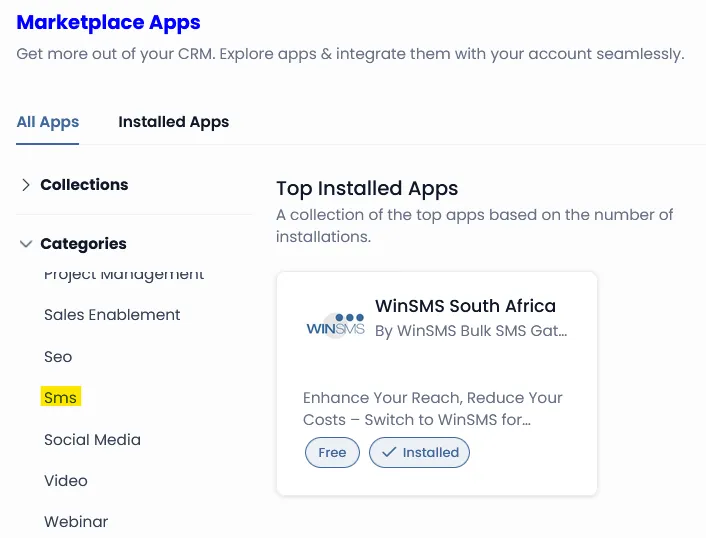
After successful installation, navigate to the (newly added), "WinSMS Admin" menu link.
Paste your copied API key into the field provided, and click [CONNECT].
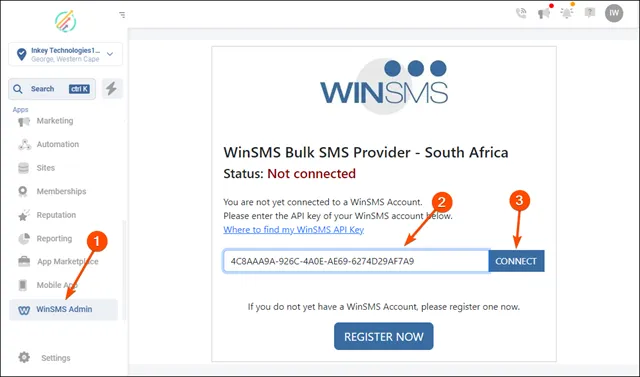
You should see a confirmation message (1) and the page status change (2)

Now navigate to Settings -> Phone Numbers -> Advanced Settings Tab.
Then select "WinSMS Bulk SMS Provider - South Africa" as your new DEFAULT SMS Provider, and click [Save].
You now can start sending SMS messages and receiving SMS replies as you normally would, and your messages will be delivered via the WinSMS gateway.

In your platform, go to contacts and send yourself an SMS message.
Confirm that, after 10-30 seconds you see a timestamp (1) - this indicates the successful SMS delivery time.

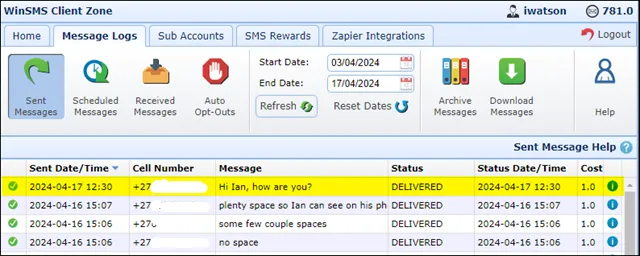
Log into the WinSMS Client Zone here and check the "Sent Logs" for your message.
You can also download your sent logs.
Reply to the SMS from your mobile phone, and ensure that you see the reply.

You can also view and download you replies in the WinSMS Client Zone.

Support: If you experience any problems or have any questions please don't hesitate to contact us here.
Known Issue: There is one known edge-case issue that we are working on getting resolved. Click here to read about the issue and how get around it.